

Google Automotive Keyboard
by Google LLC (0 Reviews) May 28, 2026Favorites
Latest Version
Update
May 28, 2026
May 28, 2026
Developer
Google LLC
Google LLC
Categories
Productivity
Productivity
Platforms
Android
Android
Downloads
0
0
License
Free
Free
Package Name
com.google.android.apps.automotive.inputmethod
com.google.android.apps.automotive.inputmethod
Report
Report a Problem
Report a Problem
| Advertisement: |


| Advertisement: |
More About Google Automotive Keyboard
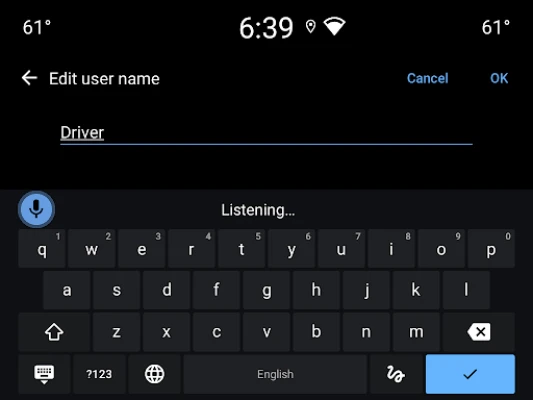
Google Automotive Keyboard has everything you love about Google Keyboard: Speed, Reliability, Glide Typing, Voice Typing, Handwriting, and more
Voice typing — Easily dictate text on the go
Glide Typing — Type faster by sliding your finger from letter to letter
Handwriting — Write in cursive and printed letters
Language support including:
Arabic, Chinese, Czech, Dutch, English, French, German, Greek, Indonesian, Italian, Japanese, Norwegian, Polish, Portuguese, Romanian, Russian, Spanish, Swedish, Thai, Turkish, Ukrainian, and many more!
Pro tips:
• Cursor movement: Slide your finger across the space bar to move the cursor
• Adding a language:
1. Go to Settings → System → Languages & input → Keyboard → Google Automotive Keyboard
2. Select a language to add. A globe icon will appear on the keyboard
• Switching languages: Tap the globe icon to switch between enabled languages
• Viewing all languages Long-press the globe icon to view a list of all languages enabled on the keyboard
Glide Typing — Type faster by sliding your finger from letter to letter
Handwriting — Write in cursive and printed letters
Language support including:
Arabic, Chinese, Czech, Dutch, English, French, German, Greek, Indonesian, Italian, Japanese, Norwegian, Polish, Portuguese, Romanian, Russian, Spanish, Swedish, Thai, Turkish, Ukrainian, and many more!
Pro tips:
• Cursor movement: Slide your finger across the space bar to move the cursor
• Adding a language:
1. Go to Settings → System → Languages & input → Keyboard → Google Automotive Keyboard
2. Select a language to add. A globe icon will appear on the keyboard
• Switching languages: Tap the globe icon to switch between enabled languages
• Viewing all languages Long-press the globe icon to view a list of all languages enabled on the keyboard
| Advertisement: |
Rate the App
Add Comment & Review
User Reviews
Based on 0 reviews
No reviews added yet.
Comments will not be approved to be posted if they are SPAM, abusive, off-topic, use profanity, contain a personal attack, or promote hate of any kind.






| Advertisement: |
More »

Popular Apps

WhatsApp MessengerWhatsApp LLC

WhatsApp BusinessWhatsApp LLC

WhatsApp DesktopWhatsApp LLC

Facebook Messenger DesktopMeta

Hide Photos and VideosSatella Apps

Facebook DesktopMeta

Chismy - Mex Social NetworkSatella Apps

Hide Pictures & VideosGeo Apps MX

Facebook LiteMeta

Road to Valor: EmpiresDreamotion Inc.
| Advertisement: |
More »
Editor's Choice
Facebook Messenger DesktopMeta
Facebook DesktopMeta
WhatsApp DesktopWhatsApp LLC
Chismy - Mex Social NetworkSatella Apps
Hide Photos and VideosSatella Apps
Hide Pictures & VideosGeo Apps MX
WhatsApp BusinessWhatsApp LLC
WhatsApp MessengerWhatsApp LLC

Grim Soul: Dark Survival RPGBrickworks Games Ltd

Craft of Survival - Gladiators101XP LIMITED
| Advertisement: |
| Advertisement: |
 Android
 iOS
iOS Windows
 Mac
Mac Linux
Linux| Advertisement: |